Depot Cam
 Override 2026
 Shop 01867
 AI Recaps
 LTE’s
LTE’s Police and Fire Scanner
 Search & Ask Recap AI
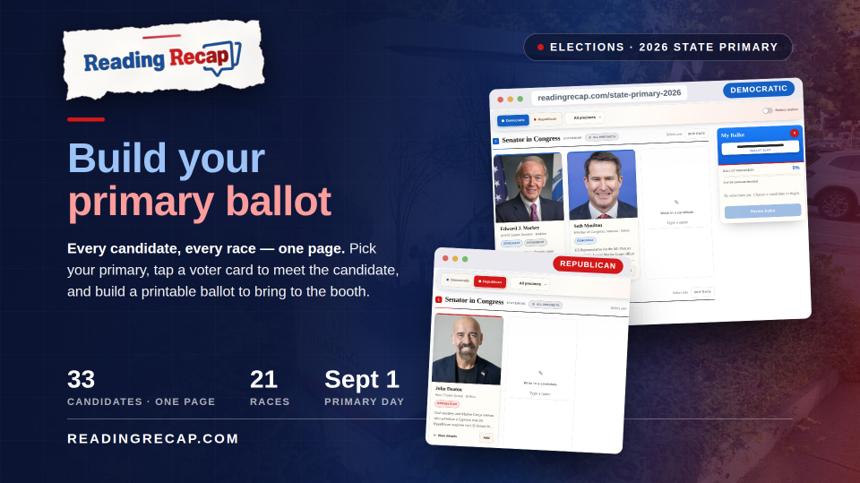
Reading Recap has launched a new interactive tool for the September 1 state primary: the 2026 State Primary Ballot Builder, now live at readingrecap.com/state-primary-2026 and under Town Gov't → Elections in the site menu. For the first time, every candidate in every race that will appear in front of a Reading voter — all 33 candidates across 21 contests — is gathered on a single page. No hunting through campaign sites or sample ballots: pick the Democratic or Republican primary, select your precinct, and the page shows you exactly the races you'll see in the booth, including the districts that split our town (precincts 1, 7, and 8 vote in the 20th Middlesex race, precincts 2–6 in the 30th).
Each candidate appears as a "voter card" with their photo, background, and links to their campaign website and social pages — tap any card to read more, then hit Add and watch your pick drop into the ballot box, which tracks your progress race by race. There's room for write-ins, and when you've decided your contests, hit Review Ballot to print a clean one-page list of your picks to bring with you to the polls. Everything works just as smoothly on your phone as on a desktop, and your choices never leave your device — nothing is uploaded, tracked, or shared.
To be clear: this is an unofficial, educational tool — it isn't connected to any government agency, and nothing you tap here casts a real vote. It's simply a way to walk into the booth on September 1 already knowing your ballot. Early voting information is right at the top of the page. Take five minutes, meet your candidates, and build your ballot.